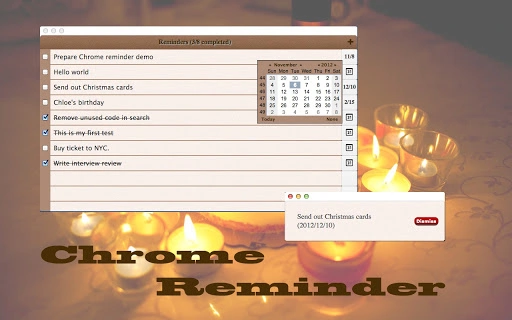

Chrome Reminder: Simple, Synced Alerts
Overview
Chrome Reminder is a desktop application designed to help users stay on top of important dates, tasks, and events without relying on complex scheduling tools. Built specifically for users who value simplicity and seamless integration, it serves as a lightweight yet effective reminder system. The software enables users to set custom alerts for birthdays, anniversaries, work deadlines, or personal goals, ensuring that no significant event slips through the cracks. It is particularly useful for individuals managing multiple personal and professional commitments across devices.
Target users include busy professionals, students, and everyday users who need a reliable, no-frills method to track time-sensitive information. The app’s core strength lies in its integration with Chrome, allowing for automatic syncing when online. This makes it ideal for users who frequently switch between devices and want consistent access to their reminders. While the developer is listed as Chrome Apps, no additional background or company details are available.
Real-world usage scenarios include setting birthday reminders for family members, tracking project milestones, or preparing for recurring meetings. The app functions as a digital assistant for personal organization, especially for those who prefer not to use full-featured calendar applications. Its ability to operate offline ensures functionality even without internet access, making it a dependable companion in various environments.
Key Features & Capabilities
- Offline Support: The application can be used without an active internet connection, allowing users to set and manage reminders in environments with limited or no connectivity.
- Passive Notifications: Once a reminder is set, the app continues to function in the background. Users can close the application, and it will still deliver notifications at the scheduled time as long as Chrome remains active.
- Sync Across Devices: When Chrome synchronization is enabled, reminders are automatically synced across devices, ensuring consistent access to updated entries regardless of the device being used.
- Complete List View: Users can view all stored reminders in a single, organized list, making it easy to review upcoming events and manage entries efficiently.
- Priority Setting: Each reminder can be assigned a priority level, helping users distinguish between urgent and low-priority tasks or events.
- Entry Management: The app allows users to delete unwanted reminders and edit existing ones, providing full control over their data.
- Export Functionality: Version 0.61 introduced the ability to export all entries to a file, enabling users to back up their data or transfer it to other systems.
These features collectively support a streamlined workflow for users who need a dependable way to track time-sensitive information. For example, a user can set a priority reminder for a client meeting, export the list before switching devices, and ensure the reminder remains accessible through Chrome sync.
User Interface, Workflow & Performance
The user interface is designed with minimalism in mind, prioritizing clarity and ease of use. Navigation is straightforward, with a clean layout that displays all reminders in a list format. Users can quickly add, view, edit, or delete entries through intuitive controls, reducing the learning curve for new users.
Workflow efficiency is enhanced by the passive notification system, which eliminates the need to keep the app open. The application operates silently in the background, delivering alerts on time without requiring user interaction. This behavior is ideal for users who want to maintain focus on their primary tasks while still receiving timely reminders.
Performance observations are based on general software behavior patterns. The application is lightweight, with a file size of 10.2 MB, suggesting efficient resource usage. However, exact performance details such as CPU or RAM consumption were not specified by the developer. Stability is expected to be consistent given the app’s limited scope and focus on core functionality. No reports of crashes or errors were mentioned in the release notes.
Compatibility & System Requirements
Chrome Reminder is available for Windows, Mac, and Linux operating systems, making it accessible to a broad range of users across different platforms. The software version is 0.61, with a file size of 10.2 MB, indicating a compact installation package.
Exact system requirements were not listed. Compatibility information is limited to the supported operating systems. The developer did not provide additional details about hardware specifications or minimum system configurations. Users should ensure their system meets general requirements for running Chrome-based applications, though specific thresholds are unknown.
Pros and Cons
Pros
- Lightweight design with a small file size of 10.2 MB
- Supports offline usage without internet dependency
- Passive notifications allow background operation
- Chrome sync integration ensures cross-device consistency
- Priority tagging helps manage task importance
- Export feature available in version 0.61
- Free to use with no cost barrier
Cons
- No detailed system requirements provided
- Performance metrics such as CPU or RAM usage not specified
- Relies on Chrome being active for notifications
- Limited to Chrome-based sync ecosystem
- No built-in backup or cloud storage beyond Chrome sync
FAQ Section
Is Chrome Reminder compatible with all major operating systems?
Yes, the application is compatible with Windows, Mac, and Linux systems as stated in the product details.
Can I use Chrome Reminder without an internet connection?
Yes, the app supports offline functionality, allowing users to set and manage reminders without an active internet connection.
How does the sync feature work?
When Chrome synchronization is enabled, reminders are synced across devices. This ensures that updates made on one device are reflected on others when online.
Is the software secure to use?
As a Chrome-based application, it leverages Chrome’s security framework. However, no specific security measures were detailed by the developer.
Can I export my reminders to a file?
Yes, version 0.61 includes an export feature that allows users to save all entries to a file for backup or transfer purposes.
Final Thoughts
Chrome Reminder delivers a focused, no-nonsense solution for users seeking a simple yet effective way to manage personal and professional reminders. Its integration with Chrome, combined with offline support and passive notifications, makes it a reliable tool for staying organized. The addition of the export feature in version 0.61 enhances data portability and backup options.
While the app lacks detailed system specifications and relies on Chrome’s presence for full functionality, its lightweight nature and free access make it a strong choice for users who value simplicity and seamless cross-device access. It is especially beneficial for those already invested in the Chrome ecosystem and looking for a minimal reminder tool.
For anyone seeking a straightforward, dependable way to never miss an important date, Chrome Reminder offers a practical and accessible solution. Download Chrome Reminder now.







